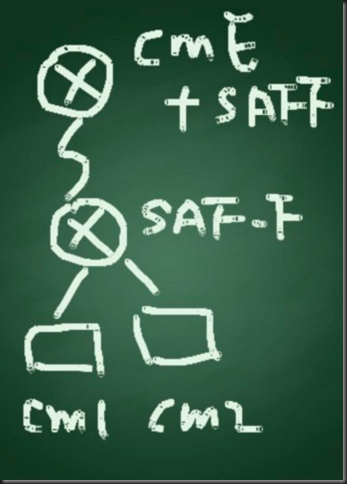
Scenario: In this test lab setup, there are 2 CM clusters and 1 CME and they are using SAF to advertise and learn their dial plan. Both CM clusters are sharing the same SAF Forwarder, on the other hand CME are co-host with the SAF Forwarder using the same ISRG2 router.
The IOS version is 15.2, and it is a bit different from the configuration in the past. The “external label” is removed from the EIGRP service family configuration, the new XMCP service routing is introduced. The SAF Forwarder is the XMCP server and the UCM is the XMCP client.
Topology:
SAF Forwarder Configuration (for both UCM clusters)
SAF1#sh run
Building configuration...
Current configuration : 1958 bytes
!
! Last configuration change at 19:18:45 HKT Fri Mar 23 2012
version 15.2
service timestamps debug datetime msec
service timestamps log datetime msec
no service password-encryption
!
hostname SAF1
!
boot-start-marker
boot-end-marker
!
!
enable password cisco
!
no aaa new-model
clock timezone HKT 8 0
mmi polling-interval 60
no mmi auto-configure
no mmi pvc
mmi snmp-timeout 180
!
!
!
!
!
ip cef
no ipv6 cef
multilink bundle-name authenticated
!
!
!
!
!
!
!
username cisco
!
!
!
!
!
!
interface Ethernet0/0
no ip address
shutdown
!
interface Ethernet0/1
no ip address
shutdown
!
interface Ethernet0/2
no ip address
shutdown
!
interface Ethernet0/3
no ip address
shutdown
!
interface Ethernet1/0
no ip address
shutdown
!
interface Ethernet1/1
ip address dhcp
!
interface Ethernet1/2
no ip address
shutdown
!
interface Ethernet1/3
no ip address
shutdown
!
interface Serial2/0
no ip address
shutdown
serial restart-delay 0
!
interface Serial2/1
no ip address
shutdown
serial restart-delay 0
!
interface Serial2/2
no ip address
shutdown
serial restart-delay 0
!
interface Serial2/3
no ip address
shutdown
serial restart-delay 0
!
interface Serial3/0
no ip address
shutdown
serial restart-delay 0
!
interface Serial3/1
ip address 10.20.1.1 255.255.255.252
serial restart-delay 0
!
interface Serial3/2
no ip address
shutdown
serial restart-delay 0
!
interface Serial3/3
no ip address
shutdown
serial restart-delay 0
!
!
router eigrp SAFTEST
!
service-family ipv4 autonomous-system 1
!
topology base
exit-sf-topology
exit-service-family
!
router ospf 1
network 0.0.0.0 255.255.255.255 area 0
!
ip forward-protocol nd
!
no ip http server
!
service-routing xmcp listen ipv4
client username safuser password 0 safpassword
domain 1 default
!
!
!
!
!
mgcp profile default
!
!
!
!
voice service saf
!
!
!
line con 0
privilege level 15
logging synchronous
line aux 0
line vty 0 4
login
transport input all
!
!
end
Show command
SAF1# show service-routing xmcp server
XMCP Server listening on port 4788
Socket descriptors: 0 (TCP/IPv4)
Connected clients: 0 unauthenticated, 2 total
Maximum clients: unlimited
Allow-lists: <none>
Clients configured:
Username "safuser", 2 client(s) connected
SAF1# show service-routing xmcp client
Service-Routing XMCP Clients
Codes: A - Authenticated, T - TCP
Handle Address Port Keepalive
AT 3 192.168.90.223 34220 22/30
Client name: UCM/CM_cm86/NodeId=1/8.6.1.20000-1
AT 4 192.168.90.201 60342 16/30
Client name: UCM/192.168.90.201/NodeId=1/8.5.1.10000-26
SAF1# show service-routing database
Service-Routing Database
Service ID (Service:Subservice:Instance) Trust Domain Owner Size
------------------------------------------------ --------- ------ ----- -----
100:1:31000000-0000-0000-0000-000000000000 Connected * 1 319
100:2:31000000-0000-0000-0000-000000000000 Connected * 1 1086
101:2:275952D8-C2F9-38A8-AE06-8CE5000160D1 Connected 1 3 665
101:2:733EF17C-84BD-5610-0325-D23200019F2E Connected 1 4 676
UCM Configuration
SAF Security Profile

SAF Forwarder (Client Label = username in new XCMP configuration)

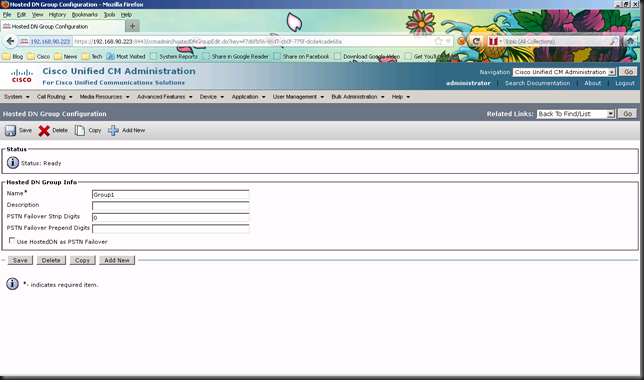
Hosted DN Group
Hosted DN Pattern
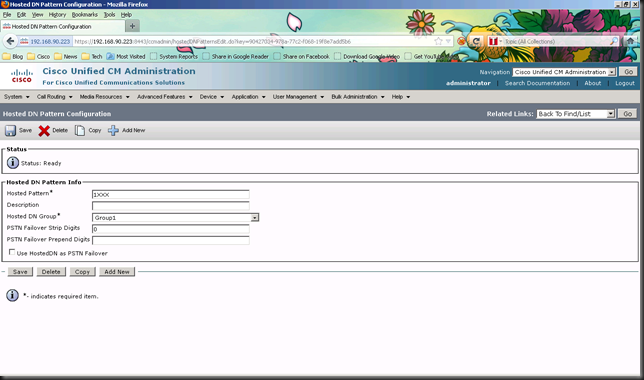
Advertising Service

CCD Partition
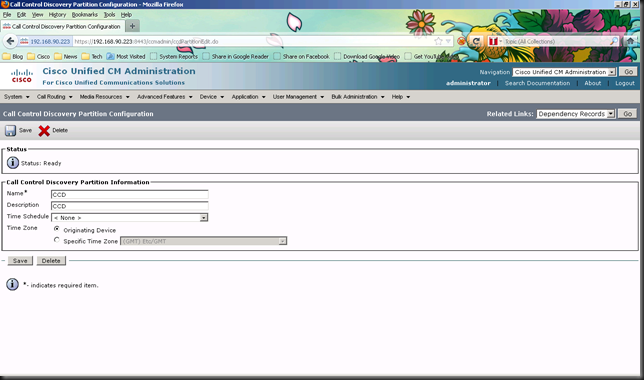
Requesting Service

SAF Trunk

RTMT – The learnt dial plan is shown in RTMT

Then let’s move on to see the CME + SAF Forwarder configuration
CME + SAF Forwarder + SAF Client config
Current configuration : 2508 bytes
!
! Last configuration change at 20:42:48 HKT Fri Mar 23 2012
version 15.2
service timestamps debug datetime msec
service timestamps log datetime msec
no service password-encryption
!
hostname SAF2
!
boot-start-marker
boot-end-marker
!
!
!
no aaa new-model
clock timezone HKT 8 0
mmi polling-interval 60
no mmi auto-configure
no mmi pvc
mmi snmp-timeout 180
!
!
!
!
!
ip cef
no ipv6 cef
multilink bundle-name authenticated
!
!
!
!
!
!
!
!
!
!
!
!
!
interface Loopback0
ip address 10.20.30.1 255.255.255.255
!
interface Ethernet0/0
no ip address
shutdown
!
interface Ethernet0/1
no ip address
shutdown
!
interface Ethernet0/2
no ip address
shutdown
!
interface Ethernet0/3
no ip address
shutdown
!
interface Ethernet1/0
no ip address
shutdown
!
interface Ethernet1/1
no ip address
shutdown
!
interface Ethernet1/2
no ip address
shutdown
!
interface Ethernet1/3
no ip address
shutdown
!
interface Serial2/0
no ip address
shutdown
serial restart-delay 0
!
interface Serial2/1
no ip address
shutdown
serial restart-delay 0
!
interface Serial2/2
no ip address
shutdown
serial restart-delay 0
!
interface Serial2/3
no ip address
shutdown
serial restart-delay 0
!
interface Serial3/0
no ip address
shutdown
serial restart-delay 0
!
interface Serial3/1
ip address 10.20.1.2 255.255.255.252
serial restart-delay 0
!
interface Serial3/2
no ip address
shutdown
serial restart-delay 0
!
interface Serial3/3
no ip address
shutdown
serial restart-delay 0
!
!
router eigrp SAFTEST
!
service-family ipv4 autonomous-system 1
!
topology base
exit-sf-topology
exit-service-family
!
router ospf 1
network 0.0.0.0 255.255.255.255 area 0
!
ip forward-protocol nd
!
no ip http server
!
!
!
!
!
!
dial-peer voice 1000 voip
destination-pattern ^1...$
session target saf
!
dial-peer voice 2000 voip
destination-pattern ^2...$
session target saf
!
mgcp profile default
!
!
!
!
voice service saf
profile trunk-route 1
session protocol h323 interface Loopback0 transport tcp port 1720
session protocol sip interface Loopback0 transport udp port 5060
!
profile dn-block 1
pattern 1 type extension 3xxx
!
profile callcontrol 1
dn-service name test
trunk-route 1
dn-block 1
!
!
call
timer aar-ageout 15
pattern prefix
!
!
channel 1 vrouter SAFTEST asystem 1
subscribe callcontrol wildcarded
publish callcontrol 1
!
!
!
telephony-service
max-ephones 30
max-dn 30
ip source-address 10.20.30.1 port 2000
max-conferences 4 gain -6
transfer-system full-consult
!
!
ephone-dn 1
number 3001
!
!
ephone 1
mac-address AABB.CCDD.EEFF
type 7965
button 1:1
!
!
!
line con 0
logging synchronous
line aux 0
line vty 0 4
login
transport input all
!
!
end
RTMT – See the learnt DNs from CME


