
Showing posts with label CUCME. Show all posts
Showing posts with label CUCME. Show all posts
Tuesday, July 10, 2012
SIP CME - authentication register
For SIP CME configuration, you will find local phones can register to CME without the need of "authentication register" command. The CME will authenticates the MAC address compare with the ARP request.
For remote phones that are NOT in the same subnet, SIP digest authentication is required. You need username and password stored in the phone config file, and compare it against the voice register pool.
Without "authentication register", when you do a "debug ccsip message", you will see 401 Unauthorized for the remote phones.
"authentication register" is a global settings and will affect all phones.
Sample configuration
voice service voip
allow-connections sip to sip
sip
bind control source-interface vlan102
bind media source-interface vlan102
!
voice register global
mode cme
source-address 1.1.1.1 port 5060
max-dn 20
max-pool 20
authenticate register
!
voice register dn 1
number 1001
!
voice register pool 1
id mac 0011.2233.4455
type 3905
number 1 dn 1
dtmf-relay sip-notify
username 1001 password cisco
codec g711ulaw


Sunday, February 26, 2012
Cisco UCM + CUE integration - in SRST scenario
In previous post I have highlighted the steps and procedures that are required for a UCM + CUE JTAPI integration:
http://pandaeatsbamboo.blogspot.com/2012/02/ucm-cue-integration-example-step-by.html
What if the CUE is located at a branch site and the connection between UCM and CUE is broken? When the WAN link is downed, SRST kicks in and the CUE can change from a JTAPI integration into a SIP integration, so that the SRST router can talk to CUE via SIP.
0. Assume you have the JTAPI integration in place, for normal situation when the connection between hub site and branch is up:
http://pandaeatsbamboo.blogspot.com/2012/02/ucm-cue-integration-example-step-by.html
1. Configure CUE SIP subsystem, the gateway address is your SRST router address:
http://pandaeatsbamboo.blogspot.com/2012/02/ucm-cue-integration-example-step-by.html
What if the CUE is located at a branch site and the connection between UCM and CUE is broken? When the WAN link is downed, SRST kicks in and the CUE can change from a JTAPI integration into a SIP integration, so that the SRST router can talk to CUE via SIP.
0. Assume you have the JTAPI integration in place, for normal situation when the connection between hub site and branch is up:
http://pandaeatsbamboo.blogspot.com/2012/02/ucm-cue-integration-example-step-by.html
1. Configure CUE SIP subsystem, the gateway address is your SRST router address:
ccn subsystem sip
gateway address "192.168.166.254"
mwi sip unsolicited
2. Configure SIP trigger, the voicemail pilot number:
ccn trigger sip phonenumber 1110
application "voicemail"
3. Configure the SIP dial-peer on your router
dial-peer voice 1110 voip
destination-pattern ^1110$
session protocol sipv2
session target ipv4:192.168.166.254
dtmf-relay sip-notify
codec g711ulaw
4. Configure the SIP MWI:
sip-ua
mwi-server ipv4:142.1.66.253 expires 3600 port 5060 transport udp unsolicited
5. Sample CME as SRST configuration
telephony-service
srst mode auto-provision none
srst ephone template 1
srst dn template 1
srst dn line-mode octo
max-ephones 20
max-dn 20 no-reg
ip source-address 192.168.166.254 port 2000
voicemail 1110
mwi relay
max-conferences 8 gain -6
transfer-system full-consult
create cnf-files version-stamp 7960 Feb 25 2012 01:03:36
!
!
ephone-dn-template 1
call-forward busy 1110
call-forward noan 1110 timeout 20
mwi sip
huntstop channel 1
!
When the WAN link is downed, your branch phone can still access your local CUE, leave and retrieve voicemail as usual and the end user experience, MWI, etc will be the same.
Cisco B-ACD on CME router - Drop-through option
In Cisco CME B-ACD, drop-through option can be configured so that when the AA services receive the incoming call, it will send the call directly to the call queue without provide menu options to callers. This is useful for some small contact center backup, when the WAN link is downed and the site can't reach the contact center express or enterprise in the main site, it can still provide basic ACD service to the callers.
My Sample Configuration:
For more information:
http://www.cisco.com/en/US/docs/voice_ip_comm/cucme/bacd/configuration/guide/40bacd.html
My Sample Configuration:
application
service aa flash:app-b-acd-aa-3.0.0.2.tcl
paramspace english index 0
param number-of-hunt-grps 1
param drop-through-option 1
param handoff-string aa
paramspace english language en
param max-time-vm-retry 2
param aa-pilot 5000
paramspace english location flash:
param second-greeting-time 60
param drop-through-prompt _dt_prompt.au
param call-retry-timer 15
param voice-mail 5555
param max-time-call-retry 700
param service-name callq
!
service callq flash:app-b-acd-3.0.0.2.tcl
param queue-len 10
param aa-hunt1 5600
param queue-manager-debugs 1
param number-of-hunt-grps 1
dial-peer voice 5000 pots
service aa
incoming called-number 5000
ephone-hunt 1 longest-idle
pilot 5600
list 5111, 5112
When there is incoming call, on both of the phone with ephone-dn 5111 and 5112, the message "1 call in queue" will be shown on the phone screen and you will know how many callers waiting in the call queue.
For more information:
http://www.cisco.com/en/US/docs/voice_ip_comm/cucme/bacd/configuration/guide/40bacd.html
Saturday, February 11, 2012
Changing CUE license
In the lab, another common task that you will work on is to changing the CUE license. For CME and UCM integration, different licensing file is required.
Firstly you can do a "show software license" see what license your CUE is currently using:
CUE# show software license
Installed license files:
- voicemail_lic.sig : 25 MAILBOX LICENSE
- ivr_lic.sig : NULL IVR LICENSE
- port_lic.sig : 8 PORT BASE LICENSE
Core:
- Application mode: CCM
- Total usable system ports: 8
Voicemail/Auto Attendant:
- Max system mailbox capacity time: 18000
- Default # of general delivery mailboxes: 10
- Default # of personal mailboxes: 25
- Max # of configurable mailboxes: 35
Interactive Voice Response:
- Max # of IVR sessions: Not Available
Languages:
- Max installed languages: 5
- Max enabled languages: 5
According to the output, my CUE is using UCM license and I wanna change it to CME. You can place your license file in your FTP server and install it on CUE:
CUE# software install clean url ftp://192.168.20.16/cue-vm-license_25mbx_cme_7.0.1.pkg username panda password eatsbamboo
WARNING:: This command will install the necessary software to
WARNING:: complete a clean install. It is recommended that a backup be done
WARNING:: before installing software.
Would you like to continue? [n]y
Downloading ftp cue-vm-license_25mbx_cme_7.0.1.pkg
Bytes downloaded : 5299
Validating package signature ... done
compatibility mode
Validating installed manifests ...............complete.
The system will be brought to offline state for a brief period
and will be brought back to online state automatically
No work order produced.
The system is back in online state
55296+0 records in
108+0 records out
Size of buff is: 65536
65536 bytes written
Parsing...
25 MAILBOX LICENSE
Parsing...
NULL IVR LICENSE
Parsing...
8 PORT BASE LICENSE
Core:
- Total usable system ports: 8
/tmp/license/voicemail_lic.sig
/tmp/license/ivr_lic.sig
/tmp/license/port_lic.sig
Important:: A Reload is required in order for the new License to take effect.
It is changed to CME licensing file successfully, reboot the CUE module for the new license to take effect.
CME cBarge - Failed to setup barge
Just labbing on the CME cBarge feature and got the error message "Failed to setup Barge" on the phone display. The reason in my case is I have forgotten to create the ad-hoc conference ephone-dn. Let us quickly walkthrough the steps that are needed to config cBarge on CME:
1. Create Conferencing DSP farm profile
dspfarm profile 1 conference
codec g711ulaw
codec g711alaw
codec g729ar8
codec g729abr8
codec g729r8
codec g729br8
maximum sessions 2
associate application SCCP
codec g711ulaw
codec g711alaw
codec g729ar8
codec g729abr8
codec g729r8
codec g729br8
maximum sessions 2
associate application SCCP
2. DSP farm profile SCCP configuration
sccp local GigabitEthernet0/0
sccp ccm 192.168.20.254 identifier 1 priority 1 version 7.0
sccp
!
sccp ccm group 1
associate ccm 1 priority 1
associate profile 1 register CFB
sccp ccm 192.168.20.254 identifier 1 priority 1 version 7.0
sccp
!
sccp ccm group 1
associate ccm 1 priority 1
associate profile 1 register CFB
3. sdspfarm configuration on CME under telephony-service
telephony-service
sdspfarm units 2
sdspfarm tag 1 CFB
no privacy
conference hardware
sdspfarm units 2
sdspfarm tag 1 CFB
no privacy
conference hardware
4. Create ephone template with cBarge softkey in remote-in-use state
ephone-template 1
softkeys remote-in-use CBarge Newcall
softkeys remote-in-use CBarge Newcall
5. Sample ephone configuration
ephone 1
privacy off
privacy-button
device-security-mode none
mac-address 0021.5555.5555
ephone-template 1
type 7965
button 1:1 2:3
!
!
!
ephone 2
privacy off
privacy-button
device-security-mode none
mac-address 0026.2222.2222
ephone-template 1
type 7975
button 1:2 2:3
privacy off
privacy-button
device-security-mode none
mac-address 0021.5555.5555
ephone-template 1
type 7965
button 1:1 2:3
!
!
!
ephone 2
privacy off
privacy-button
device-security-mode none
mac-address 0026.2222.2222
ephone-template 1
type 7975
button 1:2 2:3
6. Create shared line ephone-dn and ad-hoc conference ephone-dn
ephone-dn 3 octo-line
number 5003
!
!
ephone-dn 4 octo-line
number A123
conference ad-hoc
number 5003
!
!
ephone-dn 4 octo-line
number A123
conference ad-hoc
After I've created the ephone-dn 4 for ad-hoc conferencing, cBarge is setup successfully without the error any more!
Thursday, February 9, 2012
Preventing CME ephone-dn registering to H323 gatekeeper
If your CME also function as the H323 gateway that registers to gatekeeper, and you don't want the CME DN register to the H323 gatekeeper, you can either:
1. Disable it globally
telephony-service
max-dn 20 no-reg
Or
2. Display per ephone-dn
ephone-dn 1
number 1234 no-reg both
1. Disable it globally
telephony-service
max-dn 20 no-reg
Or
2. Display per ephone-dn
ephone-dn 1
number 1234 no-reg both
Changing Phone Header Bar Display
To change the Phone Header Bar Display (top right hand corner of the phone):
CME (SCCP)
ephone-dn 1
number 1234
desc +442056781234
CME (SIP)
voice register pool 1 ! Not in voice register dn
number 1 dn 1
description +442056781234
CM
Change the DN External Phone Number Mask
CME (SCCP)
ephone-dn 1
number 1234
desc +442056781234
CME (SIP)
voice register pool 1 ! Not in voice register dn
number 1 dn 1
description +442056781234
CM
Change the DN External Phone Number Mask
Disable CME ephone auto-registration
The default behavior for CME is to allow phone auto registration. When the phone with correct tftp configured, the phone will be registered to CME without a ephone-dn.
To disable this behavior:
telephony-service
no auto-reg-ephone
To disable this behavior:
telephony-service
no auto-reg-ephone
Wednesday, February 1, 2012
Create Meetme conference on Cisco CME
Create a meetme conference on CME is quite similar to ad-hoc conference in terms of configuration, here is an example how to create a Meetme conference on CME:
1. Create DSP Farm Porfile
sccp local GigabitEthernet0/0
sccp ccm 1.1.1.1 identifier 1 priority 1 version 7.0
sccp
!
sccp ccm group 1
associate ccm 1 priority 1
associate profile 1 register CFB
!
dspfarm profile 1 conference
codec g711ulaw
codec g711alaw
codec g729ar8
codec g729abr8
codec g729r8
codec g729br8
maximum sessions 2
associate application SCCP
2. Config telephony service to use hardware conference and associate it with the DSP Farm
telephony-service
sdspfarm units 1
sdspfarm tag 1 CFB
no privacy
conference hardware
no auto-reg-ephone
max-ephones 20
max-dn 20
ip source-address 1.1.1.1 port 2000
cnf-file location flash:
max-conferences 8 gain -6
transfer-system full-consult
3. Create ephone template that has the meetme softkey in seized state
ephone-template 1
softkeys seized Redial Endcall Cfwdall Pickup Gpickup Callback Meetme
4. Create meetme conference ephone-dn
ephone-dn 10 octo-line
number 1234 no-reg primary
conference meetme
no huntstop
An iPhone app for CME Config Generation:
http://itunes.apple.com/us/app/cme-config-generator/id453025819?ls=1&mt=8
1. Create DSP Farm Porfile
sccp local GigabitEthernet0/0
sccp ccm 1.1.1.1 identifier 1 priority 1 version 7.0
sccp
!
sccp ccm group 1
associate ccm 1 priority 1
associate profile 1 register CFB
!
dspfarm profile 1 conference
codec g711ulaw
codec g711alaw
codec g729ar8
codec g729abr8
codec g729r8
codec g729br8
maximum sessions 2
associate application SCCP
2. Config telephony service to use hardware conference and associate it with the DSP Farm
telephony-service
sdspfarm units 1
sdspfarm tag 1 CFB
no privacy
conference hardware
no auto-reg-ephone
max-ephones 20
max-dn 20
ip source-address 1.1.1.1 port 2000
cnf-file location flash:
max-conferences 8 gain -6
transfer-system full-consult
3. Create ephone template that has the meetme softkey in seized state
ephone-template 1
softkeys seized Redial Endcall Cfwdall Pickup Gpickup Callback Meetme
4. Create meetme conference ephone-dn
ephone-dn 10 octo-line
number 1234 no-reg primary
conference meetme
no huntstop
An iPhone app for CME Config Generation:
http://itunes.apple.com/us/app/cme-config-generator/id453025819?ls=1&mt=8
Saturday, January 28, 2012
Changing Background Image for CME IP phones
To change the background image of IP phone for CME is quite similar to UCM, I am using a 7965 as an example to illustrate how to get it done.
7965 resolution

7965 resolution
Actual Background Image - 320x212
Image Thumbnail - 80x53
Create 2 images based on above resolution.
1. Create directory on CME router
mkdir Desktops
cd Desktops
mkdir 320x212x16
cd 320x212x16
2. Compose a List.xml file, here the example:

Then copy the List.xml, voice-large.png and voice-small.png to flash:Desktops/320x212x16/
3. allow tftp-server file access on CME
tftp-server flash:Desktops/320x212x16/List.xml
tftp-server flash:Desktops/320x212x16/voice-large.png
tftp-server flash:Desktops/320x212x16/voice-small.png
Check out the phone User Preference > Background image, and you will see the thumbnail image. Choose it and you can change to the new background image!
For UCM, you can use the JQ Phone iPhone app to use the iPhone image to IP phone background! Check it out here:
http://pandaeatsbamboo.blogspot.com/2011/09/jq-phone-customize-your-cisco-ip-phone.html
Another iPhone app for CME Config generation:
http://itunes.apple.com/us/app/cme-config-generator/id453025819?ls=1&mt=8
Another iPhone app for CME Config generation:
http://itunes.apple.com/us/app/cme-config-generator/id453025819?ls=1&mt=8
Thursday, August 4, 2011
iPhone apps - Cisco CME Config Generator
An iPhone apps that allow you to generate Cisco CME router config without need to know a single line of CLI command!! Now on iTunes apps store!
http://itunes.apple.com/us/app/cme-config-generator/id453025819?ls=1&mt=8

http://itunes.apple.com/us/app/cme-config-generator/id453025819?ls=1&mt=8
Wednesday, July 20, 2011
Enable Video for CIPC on CME
My environment: CME 8.6, IOS 15.1(4)M, CIPC 8.6.1, CUVA 2.2.2
It takes me some time to make the "broken line" in CUVA becomes connected again. Try this if you have similar issue.
telephony-service
service phone videoCapability 1
It takes me some time to make the "broken line" in CUVA becomes connected again. Try this if you have similar issue.
telephony-service
service phone videoCapability 1
Sunday, July 17, 2011
Using PVDM3 for Video Switching - CME
My environment: IOS 15.1(4)M, CME 8.6 on 3945
The configuration of video switching DSP farm is similar to the voice conference DSP farm. There are 2 different types of video conference, homogenous and heterogenous. For homogenous, assuming the video codec and resolution for endpoints are the same. For heterogenous, you can have different endpoints with different video codec and resolution. In this post, I am trying to use 9971, 9951 with unified camera in a CME-only environment.
Since DSP farm can only registered to SCCP CME or UCM, telephony-service configuration needs to be done to allow the video conferencing dspfarm registered to it. You need AT LEAST ONE SCCP PHONE to initiate the conference ad-hoc or meet-me conference.
1. voice-card 0 configuration, the new dsp-reservation command reserves a certain portion of DSP for voice. dsp-reservation 0 means all DSP will be used for video.
The configuration of video switching DSP farm is similar to the voice conference DSP farm. There are 2 different types of video conference, homogenous and heterogenous. For homogenous, assuming the video codec and resolution for endpoints are the same. For heterogenous, you can have different endpoints with different video codec and resolution. In this post, I am trying to use 9971, 9951 with unified camera in a CME-only environment.
Since DSP farm can only registered to SCCP CME or UCM, telephony-service configuration needs to be done to allow the video conferencing dspfarm registered to it. You need AT LEAST ONE SCCP PHONE to initiate the conference ad-hoc or meet-me conference.
1. voice-card 0 configuration, the new dsp-reservation command reserves a certain portion of DSP for voice. dsp-reservation 0 means all DSP will be used for video.
voice-card 0
voice-service dsp-reservation 0
dsp services dspfarm
2. voice-service voip configuration, allow sip and h323 interwork and enable sip registrar
voice service voip
allow-connections h323 to h323
allow-connections h323 to sip
allow-connections sip to h323
allow-connections sip to sip
fax protocol t38 version 0 ls-redundancy 0 hs-redundancy 0 fallback none
sip
registrar server
3. SIP CME configuration, remember to enable unified camera and video, either globally or per phone.
voice register global
mode cme
source-address 192.168.24.11 port 5060
bandwidth video tias-modifier 1024000 negotiate end-to-end
max-dn 100
max-pool 100
tftp-path flash:
create profile sync 0000519212952386
camera
video
!
voice register dn 1
number 2001
!
voice register dn 2
number 2002
!
voice register dn 3
number 2003
!
voice register pool 1
id mac ACA0.166F.D863
type 9971
number 1 dn 1
camera
video
!
voice register pool 2
id mac ACA0.16FC.ED7F
type 9971
number 1 dn 2
camera
video
!
voice register pool 3
id mac 9CAF.CAFF.9ABE
type 9951
number 1 dn 3
camera
video
4. Homogenous video conference DSP farm configuration
sccp local GigabitEthernet0/0
sccp ccm 192.168.24.11 identifier 1 priority 1 version 7.0
sccp
!
sccp ccm group 1
associate ccm 1 priority 1
associate profile 2 register VBRIDGE
!
dspfarm profile 2 conference video homogeneous
codec g722-64
codec g711ulaw
codec h264 vga frame-rate 30 bitrate 1mbps
maximum sessions 3
associate application SCCP
5. Telephony-service configuration
telephony-service
sdspfarm units 10
sdspfarm tag 2 VBRIDGE
conference hardware
video
maximum bit-rate 1024000
max-ephones 100
max-dn 100
ip source-address 192.168.24.11 port 2000
cnf-file location flash:
max-conferences 154 gain -6
transfer-system full-consult
create cnf-files version-stamp 7960 Jul 15 2011 15:25:15
6. Create ephone-template and apply it to the ephone who wants to initiate meetme conference
ephone-template 1
conference admin
softkeys hold Join Newcall Resume Select
softkeys idle ConfList Gpickup Join Login Newcall Pickup Redial RmLstC
softkeys seized Redial Endcall Cfwdall Pickup Gpickup Callback Meetme
softkeys connected Hold Trnsfer Park Endcall Confrn ConfList Join Select RmLstC
7. Create ad-hoc video and meetme video ephone-dn
ephone-dn 10 octo-line
number 3333
conference ad-hoc video
preference 1
no huntstop
!
!
ephone-dn 11 octo-line
number 3334
conference meetme video
preference 1
no huntstop
8. Try to initiate a meetme video conference from the SCCP phone, the let the 9971 phones call in the meetme number. It will work. I don't have enough PVDM3 for heterogenous video conference therefore I didn't try the ad-hoc video conference, if you have tried it and it works, feel free to share with me your result. :)
An iPhone app for CME Config Generation:
http://itunes.apple.com/us/app/cme-config-generator/id453025819?ls=1&mt=8
An iPhone app for CME Config Generation:
http://itunes.apple.com/us/app/cme-config-generator/id453025819?ls=1&mt=8
Wednesday, February 2, 2011
CME + CUE integration
My environment: CME and CUE 7.0
CUE can be configured to integrate with CME and UCM, in this post I will give you an example on how to create integration between CME and CUE. Make sure you have the correct license, as integrating with CME and UCM requires different licenses.
Sample Configuration for CME+CUE integration
CUE can be configured to integrate with CME and UCM, in this post I will give you an example on how to create integration between CME and CUE. Make sure you have the correct license, as integrating with CME and UCM requires different licenses.
Sample Configuration for CME+CUE integration
On CME side
interface in1/0
ip unnumbered gi0/0.502
service-module ip address 1.2.3.253 255.255.255.0
service-module ip default-gateway 1.2.3.254
ip route 1.2.3.253 255.255.255.255 in1/0
dial-peer voice 4050 voip
destination-pattern 4050
session protocol sipv2
session target ipv4:1.2.3.253
dtmf-relay sip-notify
codec g711ulaw
no vad
telephony-service
voicemail 4050
ephone-dn 11
call-forward busy 4050
call-forward noan 4050 time 10
ephone 14
number 8000....
mwi on
ephone 15
number 8001....
mwi off
On CUE side
ccn application voicemail
max session 4
ccn trigger sip phonenumber 4050
application voicemail
enabled
maxsession 4
Done! You can try to either call in the voicemail pilot or press the envelop button see if you can hear the prompt. Next step is to create the user in CUE then you can leave a message.
Some other commands that you will find it useful during the integration.
Factory Reset CUE
On CUE
offline
restore factory default
Other commands
CME: service-module in1/0 session
CUE: show software license
CUE: software install clean url ftp://1.2.3.4/xxx.pkg
Sunday, January 16, 2011
cBarge and Privacy on CME
My environment: CME 7.0
Barge (SIP)
- use built-in bridge
- max 3 parties
- for SIP shared line only
cBarge (SCCP and SIP)
- SCCP octo-line
- SIP shared line
Privacy
- SCCP octo-line and SIP shared line
- enabled by default
Privacy on Hold
- disabled by default
cBarge Configuration (SCCP)
! Enabling cBarge Softkey
ephone-template 1
softkeys remote-in-use CBarge Newcall
ephone 1
ephone-template 1
button 1:1
! Create IOS conference bridge
sccp local gi0/0.502
sccp ccm 1.1.1.254 id 1 ver 7.0
sccp
sccp group ccm group 1
associate ccm 1 pri 1
associate profile 1 register CME-CFB
dspfarm profile 1 conference
codec g711ulaw
max session 4
associate application SCCP
no shut
telephony-service
sdspfarm unit 4
sdspfarm tag 1 CME-CFB
conference hardware
Privacy and Privacy on Hold
! System Level
telephony-service
privacy
privacy-on-hold
! Phone Level
ephone 1
privacy on
privacy-button
Show Command
sh sdspfarm unit all
sh sccp
sh dspfarm dsp all
Note
- When privacy on hold is enabled globally, when the phone enabled privacy (the privacy button is on), you can't see the phone is on hold on the shared line. If you disable the privacy on hold, then even the privacy button is on, you can see the phone is on hold.
Shared Line and Overlay DNs on CME
When you have started to work on CME, you will find that there are several types of shared DNs that is possible which allow great flexibility to fit your customer needs. In this post I will lay out 3 scenarios with configuration and expected result, so that you can get better understanding on how it works.
My environment: CME 7.0
Scenario 1 - one ephone DN for multiple ephone
ephone-dn 1 dual-line
number 4001
ephone 1
button 1:1
ephone 2
button 1:1
- When receive a call to 4001, both ephone 1 and 2 will ring.
- ephone 1 answers call, ephone 2 in remote in use state
- another incoming call will go to ephone 1 second channel
- yet another incoming call - will busy out, the call will not roll over to ephone 2
- ephone 2 can't use that line for outgoing call
Scenario 2 - 2 ephone-dn with same number with preference
ephone-dn 1 dual-line
number 4001
preference 1
ephone-dn 2 dual-line
number 4001
no huntstop
huntstop channel
ephone 1
button 1:1
ephone 2
button 1:2
- ephone-dn 2 is preferred to ring when somebody calls 4001
- no huntstop on ephone-dn means it continues to search for another ephone-dn with the same number, so the call will roll over to ephone 1 when ephone-dn with at least 1 channel occupied, because of the huntstop channel command
Scenario 3 - 2 ephone-dn overlays to the same button
ephone-dn 1 dual-line
number 4001
preference 1
ephone-dn 2 dual-line
number 4001
no huntstop
huntstop channel
ephone 1
button 1o1,2
ephone 2
button 1o1,2
- Both phones will ring. Say for example ephone 1 answers the call, ephone 2 still able to receive new incoming calls to 4001, and make call using the line 4001
- When ephone 1 answers the call, a new call to 4001 coming in and ephone 2 will ring, without showing call waiting on ephone 1
- If you want call waiting, then use "c" instead of "o"
Tuesday, March 30, 2010
Create tftp bindings for phone firmware automatically on CME
My environment: IOS 12.4(24)T1, CME 7.1, Cisco 2821
You can create automatic tftp bindings for all phone firmware instead of doing it manually one by one by using the “load” command under “telephony-service”. Make sure you include the firmware file suffix in order to make the tftp binding automatically. Without the suffix you need to configure it manually with the command “tftp-server flash:xxxx.loads”, etc.
Example:
telephony-service
LOAD COMMAND ERROR:cnf-file location system is not supported for creating automatic tftp bindings. Please use file location flash | slot0 | tftp OR create tftp bindings manually
Make sure you’ve entered the command “cnf-file location flash:” under “telephony-service” to specify the firmware location, then the error will go away!
An iPhone app for CME Config Generation:
http://itunes.apple.com/us/app/cme-config-generator/id453025819?ls=1&mt=8
You can create automatic tftp bindings for all phone firmware instead of doing it manually one by one by using the “load” command under “telephony-service”. Make sure you include the firmware file suffix in order to make the tftp binding automatically. Without the suffix you need to configure it manually with the command “tftp-server flash:xxxx.loads”, etc.
Example:
telephony-service
load 7962 SCCP42.8-4-2S.loadsYou might see this error after issuing the above load command:
LOAD COMMAND ERROR:cnf-file location system is not supported for creating automatic tftp bindings. Please use file location flash | slot0 | tftp OR create tftp bindings manually
Make sure you’ve entered the command “cnf-file location flash:” under “telephony-service” to specify the firmware location, then the error will go away!
An iPhone app for CME Config Generation:
http://itunes.apple.com/us/app/cme-config-generator/id453025819?ls=1&mt=8
Tuesday, July 21, 2009
Configure Extension Mobility on Cisco Unified Communications Express
My environment: CME 7.1, IOS 12.4(24)T1 on Cisco 2821 ISR
Extension mobility provides the benefit of mobility for end users, which allows a user with a configured profile to log into a phone other than their own and have access to their personal settings.
There are 4 configurable steps required for EM:
1. Configure CME for EM service:
c2821-cme(config)#ip http server
c2821-cme(config)#telephony-service
c2821-cme(config-telephony)#url authentication http://192.168.3.2/CCMCIP/authenticate.asp secretname psswrd
Updating CNF files
CNF files updating complete

c2821-cme(config-telephony)#authentication credential secretname psswrd
2. Configure a Logout profile for an IP phone (ephone):
c2821-cme(config)#voice logout-profile 1
c2821-cme(config-logout-profile)#pin 9999
c2821-cme(config-logout-profile)#user emphone password 123456
c2821-cme(config-logout-profile)#number 4005
3. Enable IP phone for EM:
c2821-cme(config-logout-profile)#ephone 2
c2821-cme(config-ephone)#logout-profile 1
4. Configure a user profile:
c2821-cme(config-ephone)#voice user-profile 1
c2821-cme(config-user-profile)#pin 12345
c2821-cme(config-user-profile)#user panda pass cisco
c2821-cme(config-user-profile)#number 4105
Configuration Video:

Screenshot:
Before Login

EM Service

Enter username and password defined in user-profile

Login Successfully

Logout

Enable Presence Service on Cisco Unified Communications Manager Express
My environment: CME 7.1, IOS 12.4(24)T1 on Cisco 2821 ISR
An iPhone app for CME Config Generation:
http://itunes.apple.com/us/app/cme-config-generator/id453025819?ls=1&mt=8
Presence enables the calling party to know before dialing whether the called party is available. It also supports Busy Lamp Field (BLF) speed-dial and phone presence status on directory call-list.
To configure the presence service, you need to:
1. Enable Presence Service
2. Enable Directory Number (DN) to be watched
3. Configure phone 1 to monitor BLF status for ephone-dn 2 (4002).
Configuration video:

Screenshots for BLF service for speed-dial and call-list:
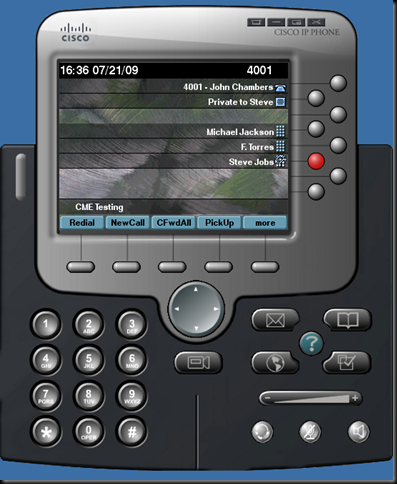
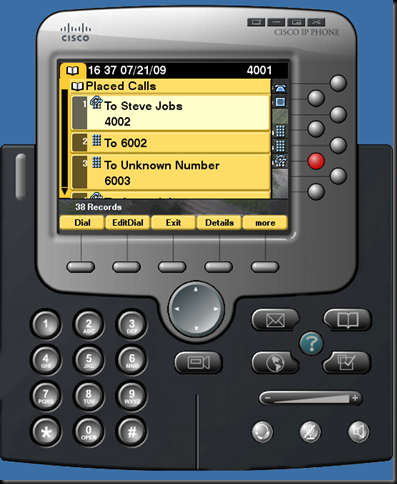
An iPhone app for CME Config Generation:
http://itunes.apple.com/us/app/cme-config-generator/id453025819?ls=1&mt=8
Presence enables the calling party to know before dialing whether the called party is available. It also supports Busy Lamp Field (BLF) speed-dial and phone presence status on directory call-list.
To configure the presence service, you need to:
1. Enable Presence Service
c2821-cme(config)#sip-ua
c2821-cme(config-sip-ua)#presence enable
c2821-cme(config-sip-ua)#exit
c2821-cme(config)#presence
c2821-cme(config-presence)#max-subscription 100
c2821-cme(config-presence)#presence call-list
c2821-cme(config-presence)#end
2. Enable Directory Number (DN) to be watched
c2821-cme#conf t
Enter configuration commands, one per line.  End with CNTL/Z.
c2821-cme(config)#ephone-dn 2
c2821-cme(config-ephone-dn)#allow watch
3. Configure phone 1 to monitor BLF status for ephone-dn 2 (4002).
c2821-cme(config)#ephone 1
c2821-cme(config-ephone)#blf-speed-dial 1 4002 label "Steve Jobs"
Configuration video:
Screenshots for BLF service for speed-dial and call-list:


Tuesday, July 14, 2009
Post-init cnf creation is in progress, pls re-issue this command later
My environment: Cisco ISR 2821 router, IOS 12.4(24)T Advanced Enterprise
CME version: 7.1.0.1
If you see this error message when you issue the “create cnf-file” command, very likely that you have missed a configuration parameters under “telephony-service”
Make sure you have:
ip source-address 1.1.1.1 port 2000
under your telephony-service.
You’ll also need to synchronize you router hardware clock with the NTP source before issue the “create cnf-file” command.
An iPhone app for CME Config Generation:
http://itunes.apple.com/us/app/cme-config-generator/id453025819?ls=1&mt=8
CME version: 7.1.0.1
If you see this error message when you issue the “create cnf-file” command, very likely that you have missed a configuration parameters under “telephony-service”
Make sure you have:
ip source-address 1.1.1.1 port 2000
under your telephony-service.
You’ll also need to synchronize you router hardware clock with the NTP source before issue the “create cnf-file” command.
An iPhone app for CME Config Generation:
http://itunes.apple.com/us/app/cme-config-generator/id453025819?ls=1&mt=8
Subscribe to:
Posts (Atom)